
Browser-local analyzer
Inspect and export
- Two local tenant slots
- Up to 5,000 rows per file
- Editable owner, route and verification fields
- CSV/JSON action-plan export
No saved workspace or account.
For Microsoft 365 MSP and CSP teams
Analyze exported sender data, assign responsibility, compare routes, and define how each change will be verified. Your team stays in control; SenderOwner does not connect to the tenant or execute the migration.
No account. No Microsoft credentials. The probe analyzes each original CSV in your browser.
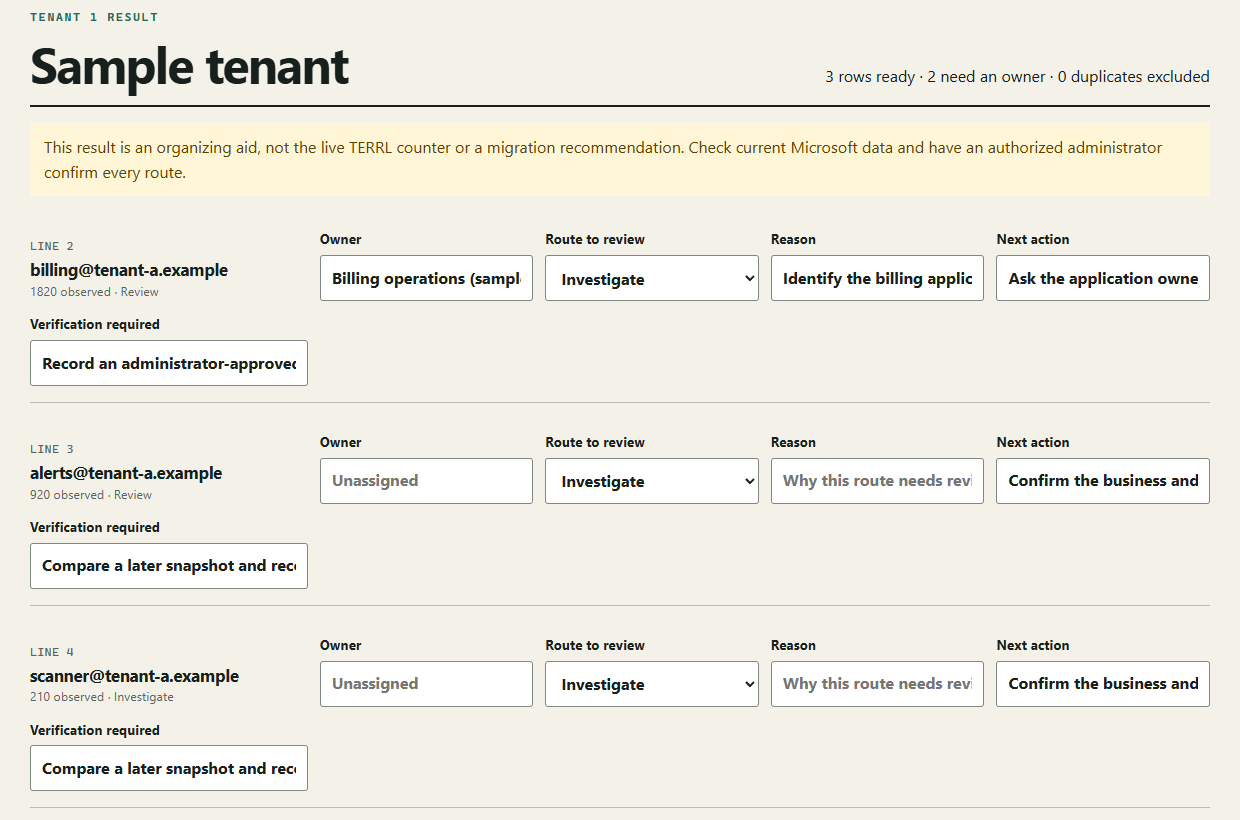
See the handoff
The analyzer creates review fields. Your team supplies the judgment. This example was entered and exported from the real interface using fictional data.
From the built-in sample
billing@tenant-a.example1,820 observed · Review
Rolling 24 hours
The downloadable CSV repeats the built-in sample in both tenant slots. It demonstrates the output format; it is not evidence of two real tenants, a validated route or a completed migration.
Download the actual sample CSV ↓A repeatable operator handoff
Select a supported CSV locally. The original file is not sent to a service.
Turn an unattributed sender row into a responsibility your team can follow up.
Mark a route for human review; the probe never approves it.
Export a next step and verification requirement, not another usage chart.
Use the same structure for a second client without rebuilding a spreadsheet.
Starts where reporting stops
| If you already use… | Keep using it for… | This probe adds… |
|---|---|---|
| EAC or Microsoft support scripts | Live state, estimates, sender attribution | Owner, route, next step, verification plan |
| A reporting product | Monitoring, reports, alerts | A narrow remediation worksheet |
| A migration provider | Executing licensed migration work | Customer-side coordination and acceptance fields |
| A spreadsheet or ticket board | Flexible notes and general tasks | Consistent fields across two client tenants |
Data boundary
The probe does not request Microsoft, SMTP, or provider credentials. It does not connect to a tenant or execute an external change.
Read the architecture draftPUBLIC PROBE · $0
The probe stays on this device. For saved tenant records, action history and export, start a no-card workspace trial or subscribe from your workspace.
See plans and the workspace trialTry the method. Keep the work.
Use the analyzer to inspect the workflow without an account. When you need saved tenant records and action history, start a workspace trial with no card.
Start workspace trialNo. You bring an export you are authorized to process. SenderOwner does not request Microsoft credentials or make changes in a tenant.
No. A route is a review decision for an authorized administrator. The sample is fictional and the analyzer is not the live TERRL counter.
The public analyzer parses the original CSV locally. The saved workspace is a separate signed-in service that stores the records needed for saved work. Read Security and Privacy for those boundaries.
Every import has a 5,000-row safety limit. The local analyzer shows the first 50 rows for editing and exports all parsed rows. Paid plans do not remove the per-file safety limit.
Yes. Use the local analyzer without an account, or start a no-card workspace trial. The trial does not convert automatically; Pricing lists its time, tenant and import limits.
Start with a reviewable result
Try the built-in sample, inspect the fields, and download a draft before bringing a customer export.
Open the local analyzer